

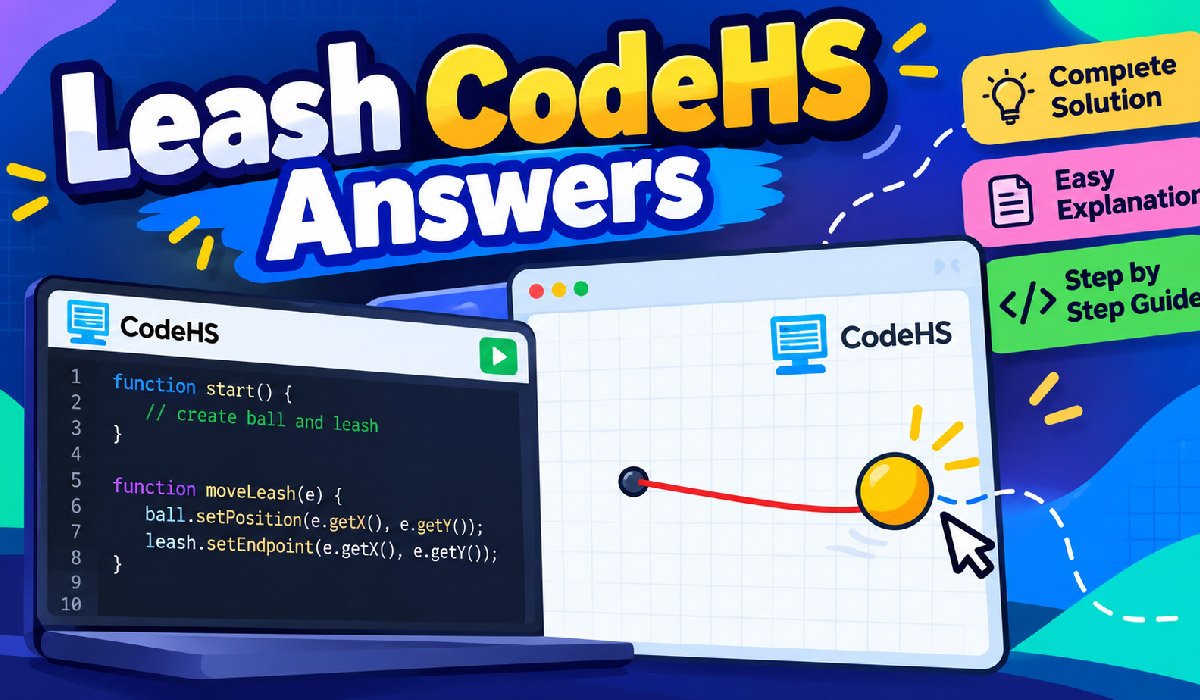
If you are searching for leash codehs answers, you are probably trying to understand how to make a ball follow the mouse while a line stays connected to it. The exercise may look confusing at first, but the main logic is actually simple.
The Leash task is designed to teach students how mouse events work in CodeHS JavaScript Graphics. You create a ball, create a line, place both near the center of the canvas, and then update their positions whenever the user moves the mouse.
In this guide, you will find a complete working solution, an easy explanation of each important part, common errors, testing tips, and the main programming concepts behind the exercise. The goal is not only to give you the answer but also to help you understand why the code works.
Quick Answer: Leash CodeHS Answers
The basic solution is to create one Circle and one Line. The line starts in the middle of the canvas. The ball also begins there.
When the mouse moves, the ball moves to the mouse position. At the same time, the endpoint of the line moves to the same coordinates.
This creates the effect of a ball attached to a leash.
var BALL_RADIUS = 30;
var ball;
var leash;

function start() {
    var centerX = getWidth() / 2;
    var centerY = getHeight() / 2;

    leash = new Line(centerX, centerY, centerX, centerY);
    add(leash);

    ball = new Circle(BALL_RADIUS);
    ball.setPosition(centerX, centerY);
    ball.setColor(Color.yellow);
    add(ball);

    mouseMoveMethod(moveLeash);
}

function moveLeash(e) {
    ball.setPosition(e.getX(), e.getY());
    leash.setEndpoint(e.getX(), e.getY());
}
This is the main logic behind most versions of the leash codehs answers exercise. Your course may use slightly different starter code, variable names, colors, or lesson numbers, but the behavior remains similar.
What Is the Leash Exercise in CodeHS?
The Leash exercise is a JavaScript graphics activity in CodeHS. It teaches students how a program can respond to mouse movement.
Instead of printing text or running a fixed animation, this task reacts directly to the person using the program. When the mouse moves, the graphics change.
The ball is usually created with a Circle object. The leash is created with a Line object. One side of the line stays fixed while the other side follows the moving ball.
This makes the exercise a simple introduction to event-driven programming.
What the Program Is Supposed to Do
The full program can be understood as a short sequence of actions.
First, the program finds the center of the canvas.
Next, it creates a line. Both ends can begin at the center.
Then, it creates a circle and places that circle in the same location.
After that, the program registers a mouse movement function.
Whenever the mouse moves, CodeHS gives the program the new mouse position.
The ball moves to that position, and the endpoint of the leash moves there too.
The starting point of the line does not change. That is what creates the leash effect.
How the Leash CodeHS Answer Works
The program begins inside the start() function. This is where the graphics are created.
The center of the canvas is calculated first. Then the line and ball are added to the screen.
Once the setup is complete, mouseMoveMethod(moveLeash); tells CodeHS to call the moveLeash function whenever the mouse moves.
The program then waits for user input.
As soon as the user moves the mouse, CodeHS sends an event to the moveLeash(e) function.
The function reads the current X and Y mouse coordinates and uses them to update the ball and line.
This cycle repeats every time the pointer moves across the canvas.
Why the Ball and Leash Variables Should Be Global
Near the top of the program, you can see:
var ball;
var leash;
These variables are written outside the functions.
This is important because more than one function needs access to the same objects.
The start() function creates the ball and leash. Later, the moveLeash() function must update them.
If the objects exist only as local variables inside start(), the movement function may not be able to use them correctly.
For this reason, the objects are usually declared globally and assigned their values inside start().
This pattern is useful in many CodeHS graphics exercises.
How to Find the Center of the Canvas
The center point is normally calculated with:
var centerX = getWidth() / 2;
var centerY = getHeight() / 2;
getWidth() returns the full width of the graphics canvas.
Dividing that number by two gives the horizontal center.
getHeight() returns the full height.
Dividing that value by two gives the vertical center.
This is better than using fixed values like 200, 200.
If the canvas size changes, the program can still find the correct center automatically.
How the CodeHS Coordinate System Works
The top-left corner of the canvas is usually treated as the starting coordinate.
That point is close to:
0, 0The X value increases as you move toward the right.
The Y value increases as you move downward.
For example, a point near the upper-left has smaller X and Y values. A point near the lower-right has larger values.
Understanding this system makes it much easier to understand why e.getX() and e.getY() can control where the ball appears.
How to Create the Ball
The ball can be created using:
ball = new Circle(BALL_RADIUS);The value stored in BALL_RADIUS controls the size of the circle.
Next, the ball is placed in the center:
ball.setPosition(centerX, centerY);You can also give it a color:
ball.setColor(Color.yellow);Finally, the ball must be added to the canvas:
add(ball);Without add(ball), the object can exist in the program but may not appear visually on the screen.
How to Create the Leash Line
The leash is created with a Line object.
A line needs four coordinate values:
- Starting X
- Starting Y
- Ending X
- Ending Y
The code may look like this:
leash = new Line(centerX, centerY, centerX, centerY);At the beginning, both ends of the line are in the same place.
That means the line may have almost no visible length when the program first starts.
Once the mouse moves, the endpoint changes and the line becomes visible.
How mouseMoveMethod Works
One of the most important parts of the leash codehs answers solution is:
mouseMoveMethod(moveLeash);This command tells CodeHS to watch for mouse movement.
When the mouse moves, CodeHS calls the moveLeash function.
Notice that there are no parentheses after moveLeash.
You should usually write:
mouseMoveMethod(moveLeash);rather than:
mouseMoveMethod(moveLeash());The first version gives CodeHS the function so it can run it later.
The second version would try to execute the function immediately.
Understanding the Event Object
The movement function may look like this:
function moveLeash(e) {The e represents the mouse event.
CodeHS provides this object automatically when the mouse moves.
The event contains useful information, including the current mouse position.
You can get that position with:
e.getX()
e.getY()
e.getX() returns the horizontal mouse position.
e.getY() returns the vertical mouse position.
These two values tell the program where the ball should move.
How the Ball Follows the Mouse
The ball moves with this line:
ball.setPosition(e.getX(), e.getY());Every time the user moves the mouse, the program reads the new coordinates.
It then changes the position of the existing ball.
The program does not create a new ball.
It simply moves the same object again and again.
This keeps the graphics clean and avoids adding unnecessary objects to the canvas.
How the Leash Stays Connected to the Ball
The line moves with:
leash.setEndpoint(e.getX(), e.getY());Only the free endpoint changes.
The starting point remains in the center.
Because the endpoint gets the same X and Y position as the ball, the line always appears to connect to it.
The relationship is simple:
Ball position = moving line endpointThat is the central idea behind the Leash exercise.
Why You Should Create the Objects Only Once
A common beginner mistake is creating a new ball inside the mouse event function.
For example, the student may try to create another Circle every time the mouse moves.
That can quickly fill the screen with many circles.
Mouse movement events can happen many times in a very short period.
The better method is:
Create once → store object → move objectThe same rule applies to the leash.
Create the line one time, then update its endpoint whenever needed.
Why Drawing Order Can Matter
The order in which objects are added to the canvas can affect how they appear.
If you add the ball first and the line later, the line may be drawn over the ball.
If you add the leash first:
add(leash);and then add the ball:
add(ball);the ball can appear above the line.
This can make the final result look cleaner.
Drawing order does not usually change the main behavior, but it can improve the visual appearance.
Common Leash CodeHS Errors and Fixes
One common problem is that the ball appears but does not move.
In that case, check whether mouseMoveMethod() is included and whether the correct function name is being passed.
Another issue is that the ball moves while the leash stays in one place.
This normally happens when setEndpoint() is missing or uses the wrong coordinates.
If the program says that ball or leash is not defined, check where those variables were declared.
They may have been created only inside start() instead of being shared with the mouse callback.
Spelling can also cause errors.
For example:
e.getX()is not the same as:
e.getx()JavaScript is case-sensitive.
You should also make sure both objects are added to the canvas with add().
Leash CodeHS Answer With Simple Line-by-Line Meaning
The first line may be:
var BALL_RADIUS = 30;This stores the ball size.
Next:
var ball;
var leash;
These variables keep references to the graphic objects.
Inside start(), the center coordinates are calculated.
The line is then created and added.
The circle is created, positioned, and added.
After that:
mouseMoveMethod(moveLeash);connects mouse movement to the callback.
Finally, inside moveLeash(e), the ball and line endpoint both receive the latest mouse coordinates.
That is the complete program flow.
How to Test Your Leash CodeHS Program
Start by running the code and checking whether the ball appears.
The ball should begin near the center.
The line may be difficult to see at first because both ends start in the same place.
Now move the mouse slowly.
The ball should follow the pointer.
The leash endpoint should also move.
The other end of the leash should remain fixed.
Move the mouse toward all four corners.
This helps you check whether both the X and Y positions are updating properly.
Also make sure the screen is not filling with extra balls or lines.
What If Your Exercise Has a Different Number?
You may search for 9.7.4 leash codehs answers and find a similar task listed as 4.7.4 or under another lesson number.
This can happen because CodeHS courses may be arranged differently.
The important thing is not only the exercise number.
Look at the required behavior.
If your task asks for a ball that follows the mouse while a line stays connected to it, the same basic logic may apply.
Always compare the code with the instructions in your own course.
Can You Use Different Variable Names?
Yes.
You may see:
var leash;in one solution and:
var line;in another.
Both can work.
The variable name itself is not the important part.
What matters is that you use the same name consistently throughout the program.
If you create line but later try to move leash, the program will not work because those are different variable names.
Can You Change the Ball Color or Radius?
In many versions, you can change the appearance if the assignment allows it.
For example:
ball.setColor(Color.blue);could make the ball blue.
Changing:
var BALL_RADIUS = 30;can make the ball larger or smaller.
However, if the assignment provides specific values, it is usually better to keep them.
Automatic graders may expect certain behavior or settings.
What This Exercise Teaches
The Leash exercise may be short, but it teaches several useful programming concepts.
You learn about variables, objects, methods, coordinates, mouse events, callback functions, and changing object state.
You also learn how interactive programs work.
The program waits for an event, receives information about that event, and updates the screen.
These same ideas are used in games, drawing applications, menus, drag-and-drop systems, and many other interactive programs.
Final Thoughts
The leash codehs answers exercise becomes much easier once you understand the flow of the program.
First, create the ball and line.
Place them in the center.
Register a mouse movement function.
When the mouse moves, get its X and Y coordinates.
Move the ball to those coordinates and update the endpoint of the leash to the same position.
Keep the starting point of the line fixed.
The most useful lesson is not simply memorizing the code. Understanding how the mouse event, ball position, and line endpoint work together will make later CodeHS graphics exercises much easier.
(FAQs)
What is the Leash exercise in CodeHS?
The Leash exercise is a JavaScript graphics task where a ball follows the mouse while a line stays connected to it. One end of the line remains fixed, usually near the center of the canvas.
What is the main Leash CodeHS answer?
The main solution is to create one Circle and one Line, register a mouse movement function, and update the ball position and line endpoint using e.getX() and e.getY().
Why is my CodeHS Leash ball not moving?
Check whether mouseMoveMethod() is connected to the correct callback function. Also make sure the function uses e.getX() and e.getY() to update the ball with setPosition().
Why is the leash line not following the ball?
The moving end of the line must be updated with setEndpoint(). It should receive the same X and Y mouse coordinates that are used for the ball.
What does mouseMoveMethod do in CodeHS?
mouseMoveMethod() tells CodeHS which function should run whenever the user moves the mouse across the graphics canvas.
What do e.getX() and e.getY() mean?
e.getX() returns the current horizontal mouse position, while e.getY() returns the vertical position. Together, they tell the program where the mouse is located.
Why are the ball and leash variables usually global?
They are often global because the objects are created in start() but updated later in another function. Global variables allow both functions to access the same objects.
Is 9.7.4 Leash the same as 4.7.4 Leash?
Some CodeHS courses may place similar exercises under different lesson numbers. The exact numbering can vary, so compare the assignment instructions and required behavior instead of relying only on the exercise number.
you may also read: TechTrendery.com Review: What It Is, Topics, Authors and Safety








Discussion about this post